
Quickbooks connector deprecation
Effective Date: January 31, 2026
Overview
After careful consideration, we’re announcing the retirement of the Better Reports QuickBooks Online (QBO) connector. While we know many users have found value in this integration over the years, maintaining it is no longer feasible given recent changes to Intuit’s developer platform and program requirements.
Better Reports has already been removed from the QBO App Store, but we will continue to offer access and support for a limited time to help users transition smoothly before the cutoff date.
Why We’re Retiring the Connector
Recent updates to Intuit’s partner program introduce new requirements and costs that make it unsustainable for us to continue maintaining this integration.
What This Means for You
If your store is currently connected to QuickBooks Online through Better Reports:
- You can continue using the connector until January 31, 2026.
- After this date, connections and data syncing will stop.
- We’ll continue to provide support during this period
We understand this change may be disruptive, and we’re committed to helping you through the transition. Our support team can assist you with exporting your data, identifying suitable alternatives, and ensuring continuity in your reporting.
How to Terminate Your Subscription
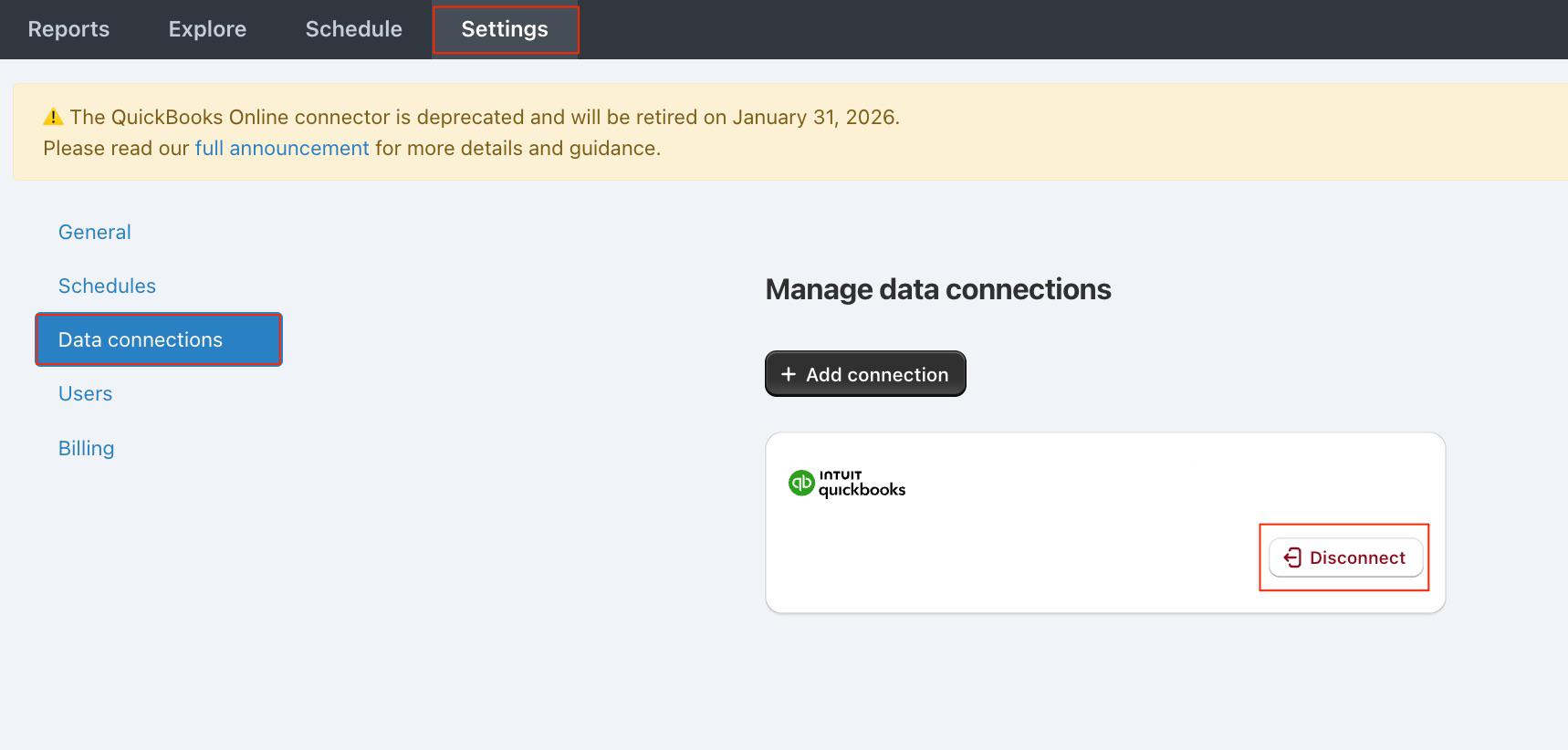
If you’d like to cancel your Better Reports subscription and remove your QuickBooks Online connection before the cutoff date, you can do so directly within the app.
- Navigate to the Settings tab in your Better Reports dashboard.
- Select Data connections.
- Select Disconnect next to your QuickBooks Online account.
Once disconnected, your Better Reports subscription will be automatically cancelled, and data syncing from QuickBooks Online will stop. If you disconnect mid-cycle, you will receive a partial refund for the unused amount.
Recommended Alternatives for QBO Reporting
While the Better Reports QBO connector will be retired, there are several excellent reporting tools available that integrate directly with QuickBooks Online and offer strong reporting capabilities:
- LiveFlow — Ideal for users who rely heavily on spreadsheets. LiveFlow connects QBO data directly to Google Sheets, allowing you to build automated, flexible financial reports.
- Reach Reporting — Great for visual, client-ready financial reporting. Reach offers powerful dashboards, templates, and customisable visuals for financial statements and KPIs.
- Fathom — A strong choice for performance analysis and consolidated reporting. Fathom is especially useful for businesses managing multiple entities or seeking advanced financial insights. Each of these tools provides strong QBO integration, automated updates, and customisable reports — helping ensure a smooth transition for your reporting workflows.
A Note of Thanks
We want to sincerely thank everyone who has used and trusted our QBO connector over the years. While we wish we could continue offering it, this change allows us to focus our resources on improving and expanding other integrations that deliver even greater value to the Better Reports community.
Thank you for your understanding and continued support.
Need more support?
If you get stuck or have additional questions, you can contact our team directly through the Help widget in the bottom-right corner — we typically respond within one business day.